
Search Window Sticker
Table of Contents
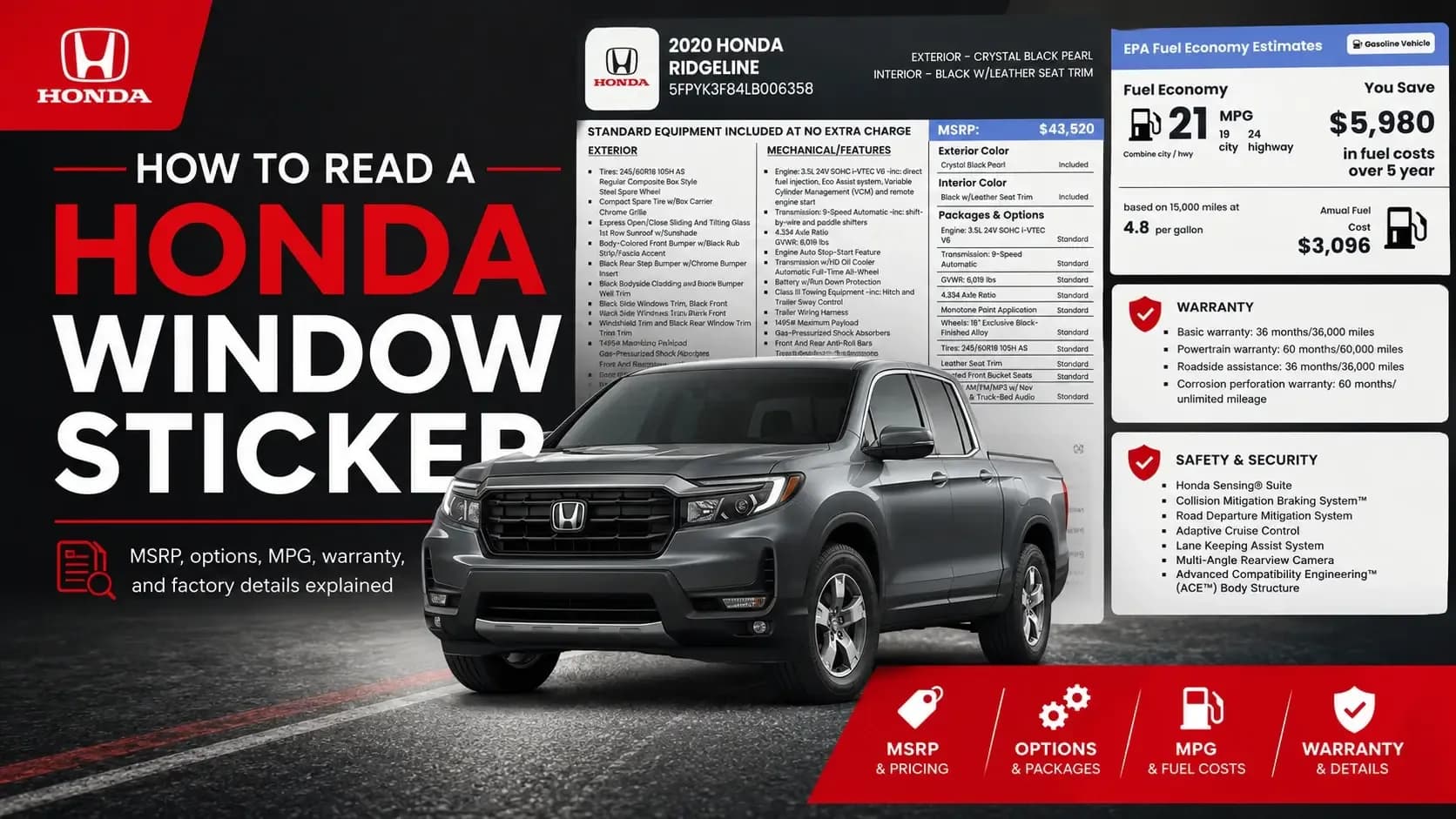
A Honda window sticker can look crowded at first. There are prices, equipment lists, color names, warranty terms, fuel economy numbers, safety ratings, and plenty of small print. But once you know where to look, the sticker becomes one of the easiest ways to understand what a Honda came with when it was new.
This guide explains how to read a car window sticker using Honda-style sticker details, including MSRP, standard equipment, factory options, original shipping charge, MPG, warranty, and safety ratings. If you need the original factory label for a Honda, you can start with a Honda window sticker lookup and compare the sticker details with the vehicle listing.
Key Takeaways
 A Honda window sticker shows the vehicle’s original factory build, price, equipment, colors, fuel economy, warranty, and safety information.
- MSRP and total vehicle price are not the same. The total price may include factory options and original shipping charge.
- A window sticker does not show accident history, title brands, odometer issues, ownership changes, liens, or salvage records.
What Is a Honda Window Sticker?
A Honda window sticker is the factory label created for a new Honda vehicle. In the U.S., this label is often called a Monroney label. It shows what the vehicle was, how it was equipped, and how it was priced when new.
Think of it as the Honda’s original sales sheet. Not a repair record. Not a history report. Not a seller’s opinion. A factory document.
A Honda window sticker may show:
- Year, make, model, and VIN
- Exterior and interior color
- Standard equipment
- Mechanical features
- Safety and security features
- Warranty coverage
- Factory options and packages
- Original MSRP
- Original shipping charge
- Total vehicle price
- EPA fuel economy estimates
- Government safety ratings
For used car buyers, this matters because listings can be vague. “Loaded” can mean almost anything. The sticker tells you what the Honda actually came with.
Why Reading the Sticker Matters Before You Buy
Here’s the thing: two Hondas can look similar in photos but have very different factory details.
A 2020 Honda Ridgeline with leather seat trim, all-wheel drive, truck-bed audio, navigation, black-painted alloy wheels, and towing equipment is not the same as a lower-equipped version. Same model name, very different value story.
1. It Helps You Confirm Factory Equipment
A sticker can show whether features were standard, factory-listed, or part of a package.
This is useful when a seller claims the Honda has certain equipment. You can check the sticker and see what the factory record says.
2. It Gives You Original Price Context
Original MSRP will not tell you today’s exact used-car value. Mileage, condition, title history, location, and demand still matter.
But MSRP gives you context. It helps explain why one used Honda may have been priced higher when new.
3. It Helps Catch Listing Mistakes
Dealer feeds are not perfect. Private sellers guess. Auction descriptions can be thin.
A window sticker lets you compare the listing against the factory label instead of trusting the ad word for word.
Honda Window Sticker Explained: Start at the Top
Most Honda window stickers begin with the vehicle’s identity. This is the first section to check.
✓ Vehicle Description
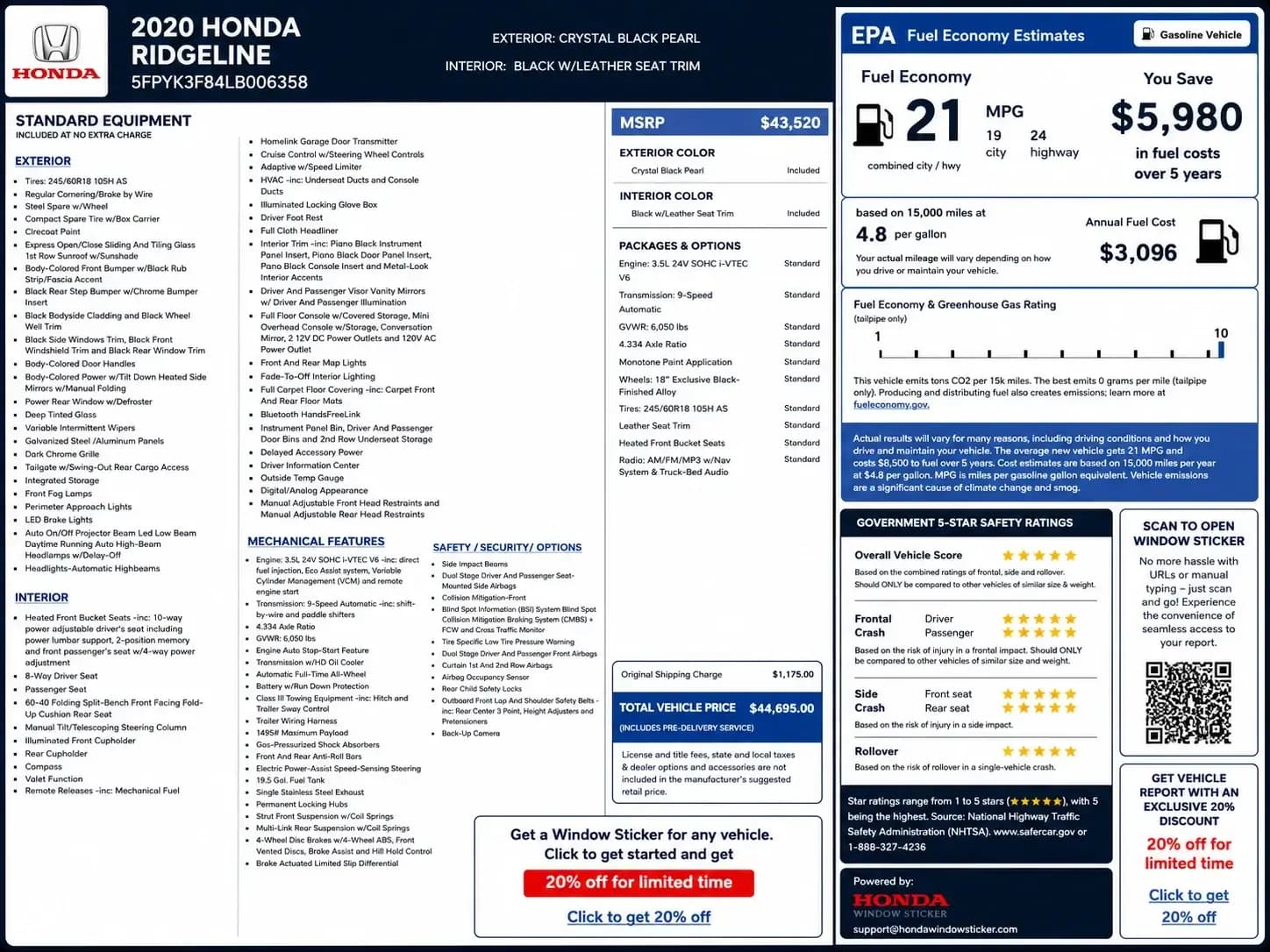
Look for the year, make, model, and VIN. For example, a sticker may show:
- 2020 Honda Ridgeline
- VIN: 5FPYK3F84LB006358
- Exterior: Crystal Black Pearl
- Interior: Black w/Leather Seat Trim
This tells you the sticker belongs to a specific Honda, not just any Ridgeline.
✓ VIN Match
The VIN on the sticker should match the VIN on the vehicle, title, registration, and door jamb label.
If the VIN does not match, stop. It could be the wrong sticker, wrong paperwork, or a listing mistake. Either way, you want that cleared up before you move forward.
✓ Exterior and Interior Colors
Color details are more useful than they look. A sticker may show Crystal Black Pearl for the exterior and Black w/Leather Seat Trim for the interior.
That can help with resale listings, paint checks, touch-up paint research, and spotting possible repaint work.
How to Read MSRP and Total Vehicle Price
The pricing section is where a lot of buyers slow down. Good. You should.
1. MSRP
MSRP means Manufacturer’s Suggested Retail Price. It is the manufacturer’s suggested price before taxes, title fees, registration, dealer fees, and other non-factory costs.
In the sample Honda Ridgeline sticker, the MSRP is listed as $43,520.
That tells you the original price level of the vehicle, but it is not the final amount someone paid out the door.
2. Original Shipping Charge
Many stickers include an original shipping or destination charge. In the Ridgeline sample, the original shipping charge is $1,175.
This fee is part of the factory sticker pricing. It reflects the cost of moving the vehicle from the manufacturer to the dealer.
3. Total Vehicle Price
The total vehicle price combines MSRP and factory-listed charges. In the sample, the total vehicle price is $44,695.
That number can help when comparing two used Hondas. But again, it is not today’s market value. A used vehicle’s current price depends on age, mileage, condition, demand, title history, and location.
How to Read Standard Equipment
Standard equipment is the long section many people skip. Don’t skip it.
This part shows what came included at no extra charge. It can be long because it may include exterior, interior, mechanical, safety, and warranty details.
1. Exterior Equipment
The exterior section may list tires, spare wheel, clearcoat paint, sunroof, bumpers, mirrors, grille, glass, lighting, tailgate details, and other outside features.
On the 2020 Ridgeline sample, exterior details include Crystal Black Pearl paint, clearcoat finish, a sliding and tilting glass sunroof, dark chrome grille, front fog lamps, LED brake lights, and automatic high-beam headlamps.
That is not just filler. Those details help buyers understand the original exterior build.
2. Interior Equipment
The interior section may list seat type, steering column, cupholders, console storage, infotainment, trim inserts, lighting, floor mats, and other cabin details.
For example, the sample Ridgeline includes heated front bucket seats, leather seat trim, piano black interior trim, Bluetooth HandsFreeLink, driver information center, and multiple storage areas.
For sellers and flippers, these details can make a listing stronger without exaggerating.
3. Mechanical Features
Mechanical features explain the powertrain and chassis details.
The sample Ridgeline shows a 3.5L 24V SOHC i-VTEC V6 engine, 9-speed automatic transmission, full-time all-wheel drive, Class III towing equipment, trailer wiring harness, 19.5-gallon fuel tank, and 4-wheel disc brakes with ABS.
This is the section buyers should read when towing, drivetrain, engine, or performance details matter.
4. Safety and Security Features
A Honda sticker may list airbags, collision systems, blind spot information, low tire pressure warning, rear child locks, backup camera, and braking technology.
The sample includes Collision Mitigation Braking System, Blind Spot Information System, Cross Traffic Monitor, backup camera, and multiple airbag systems.
Safety features can affect buyer confidence, especially for family vehicles.
How to Read Packages and Options
Packages and options usually appear in a separate pricing or equipment section.
This is where the sticker may list items as standard, included, or priced separately.
For the Ridgeline sample, the sticker lists:
- Engine: 3.5L 24V SOHC i-VTEC V6 — Standard
- Transmission: 9-speed automatic — Standard
- GVWR: 6,019 lbs — Standard
- Monotone paint application — Standard
- Wheels: 18" exclusive black-painted alloy — Standard
- Tires: 245/60R18 105H AS — Standard
- Leather seat trim — Standard
- Heated front bucket seats — Standard
- Radio: AM/FM/MP3 with navigation system and truck-bed audio — Standard
This is where understanding car window stickers gets practical. You can tell whether a feature was part of the original factory build instead of relying on a seller’s description.
How to Read Fuel Economy
The EPA fuel economy section gives estimated MPG and fuel cost information.
In the sample Ridgeline, the fuel economy is shown as:
- 21 combined MPG
- 19 city MPG
- 24 highway MPG
- Annual fuel cost estimate
- Five-year fuel cost comparison
These numbers are estimates, not promises. Your real mileage depends on driving habits, maintenance, tires, traffic, weather, and load.
Still, fuel economy matters. A truck, SUV, hybrid, or sedan may have very different long-term fuel costs. The sticker helps you compare that before buying.
How to Read Warranty Information
Warranty details show the original factory coverage when the Honda was new.
The sample Ridgeline lists:
- Basic warranty: 36 months / 36,000 miles
- Powertrain warranty: 60 months / 60,000 miles
- Corrosion perforation warranty: 60 months / unlimited distance
- Roadside assistance: 36 months / 36,000 miles
Here’s the catch. The sticker shows what the warranty was when new. It does not prove the warranty is still active today.
If you are buying used, coverage depends on age, mileage, transfer rules, repairs, and warranty terms.
How to Read Government Safety Ratings
Some window stickers include Government 5-Star Safety Ratings from the National Highway Traffic Safety Administration.
This section may show:
- Overall vehicle score
- Frontal crash rating
- Side crash rating
- Rollover rating
These ratings should be compared to vehicles of similar size and weight. That line matters. A midsize truck and a small sedan do not behave the same in crash testing.
For buyers, safety ratings are not the whole decision, but they are worth reading.
What a Window Sticker Does Not Tell You
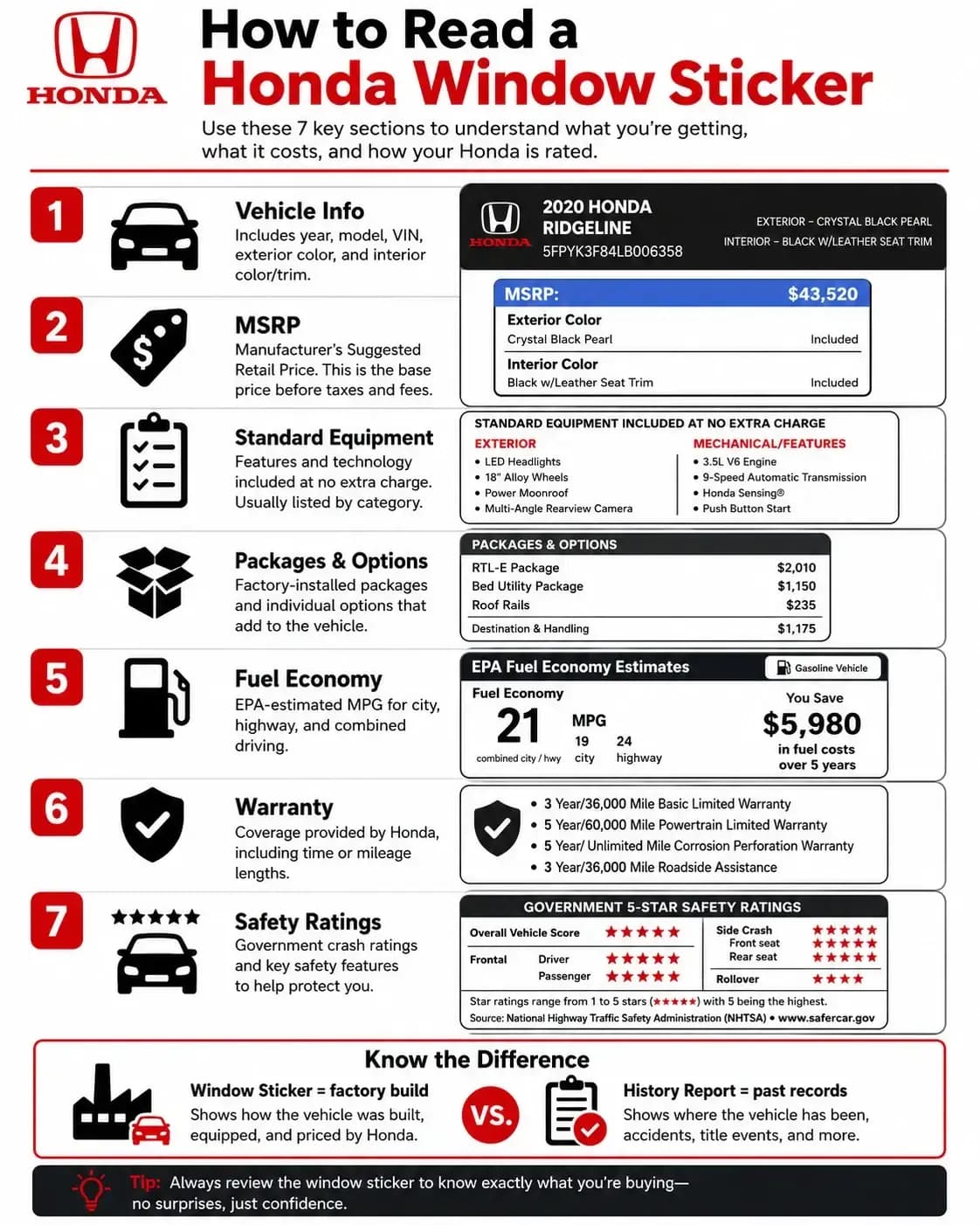
A window sticker tells you the factory story. It does not tell you the used-car story.
It usually does not show:
- Accident history
- Title brands
- Odometer problems
- Ownership changes
- Theft records
- Lien or loan records
- Auction history
- Salvage records
If you are close to buying a used Honda, compare the sticker with a Honda vehicle history report. The sticker shows how the Honda started. The history report helps show what may have happened later.
Window Sticker vs VIN Decoder vs History Report
These tools get mixed up, so let’s keep it simple.
Window Sticker
A window sticker shows original factory details: MSRP, standard equipment, options, colors, MPG, warranty, safety ratings, and total vehicle price.
VIN Decoder
A VIN decoder shows basic identity details such as year, make, model, trim, engine, body style, and plant information.
Vehicle History Report
A vehicle history report shows used-car background records, such as accidents, title brands, odometer readings, ownership changes, theft, auction activity, and others.
How Buyers, Sellers, and Flippers Can Use the Sticker
A good car window sticker guide should not only explain the label. It should show how to use it.
✓ Buyers Can Verify the Listing
Check whether the trim, colors, equipment, and price story match the seller’s claims.
If the sticker says leather seat trim and navigation, that supports the listing. If the listing says features that do not appear anywhere, ask questions.
✓ Sellers Can Build Better Listings
Use the sticker to write more accurate descriptions. Mention the real exterior color, interior color, standard equipment, factory features, MPG, and original MSRP when useful.
Specific details beat vague sales language.
✓ Flippers Can Avoid Weak Claims
Car flippers need clean, believable listings. A sticker gives you factory-backed details, which makes your description feel less like a guess.
Final Word: Read the Sticker Before You Trust the Listing
A Honda window sticker is more than a price sheet. It is a snapshot of how the vehicle was built, equipped, priced, rated, and described when new.
Once you know how to read a car window sticker, you can make better sense of MSRP, factory options, standard equipment, original shipping charge, MPG, warranty, safety ratings, exterior color, and interior trim.
It will not tell you everything. It will not inspect the car. It will not show every part of the vehicle’s past.
But it gives you the factory story, and that story is worth reading before you buy, sell, or flip a Honda.