
Decode Your Honda VIN for Free
Use our Honda VIN decoder to check basic vehicle details from your VIN. Enter a Honda VIN number to identify key information such as year, make, model, trim, body type, engine details, fuel type, assembly plant, country, serial number, and estimated market value when available.
Free Honda VIN Decoder Tool
A Honda VIN is a unique code that identifies a specific Honda vehicle. Most Honda cars, SUVs, vans, trucks, motorcycles, and powersports vehicles use a 17-character VIN.
Example Honda VIN:
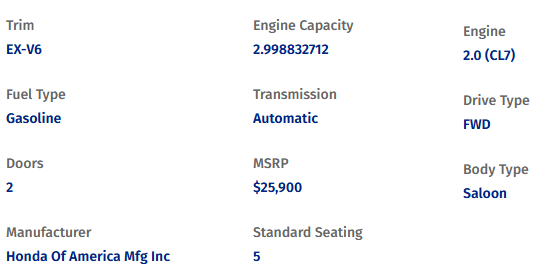
With our Honda VIN decoder, you can turn that code into basic vehicle details such as year, make, model, trim, body type, engine, fuel type, Market Value, and others
This is useful when you want to check whether a Honda listing, title, registration, insurance document, or seller description matches the actual vehicle.
What Information Does the Free Honda VIN Decoder Show?
The free decoder is designed to show basic specifications. A Honda VIN lookup is helpful when you need quick confirmation. It can help you check whether the vehicle description matches the VIN before you move forward.
The free decoder may show:
- Year
- Make
- Exterior dimensions
- Number of doors
- Ground clearance
- Standard seating
- Transmission style
- Fuel type
- Braking
- Range extender
- Engine Description
- Front airbag information
- Emissions
- Cargo dimensions
- Model
- Valve train design
- Interior dimensions
- Suspension
- Traction battery
- Engine Size and specs
- Drive Type
- Tank capacity
- Trailering
- Displacement
- Tire pressure and size
- Wheels
- Electrical powertrain
- Trim
- Country
- Steering
- Weight
- MSRP
- Body type
- Seating
- EPA Class
- Engine model
- Engine configuration
- Seat belt type
- Off-road attributes
- Electrical specifications
Honda VIN Number Locations
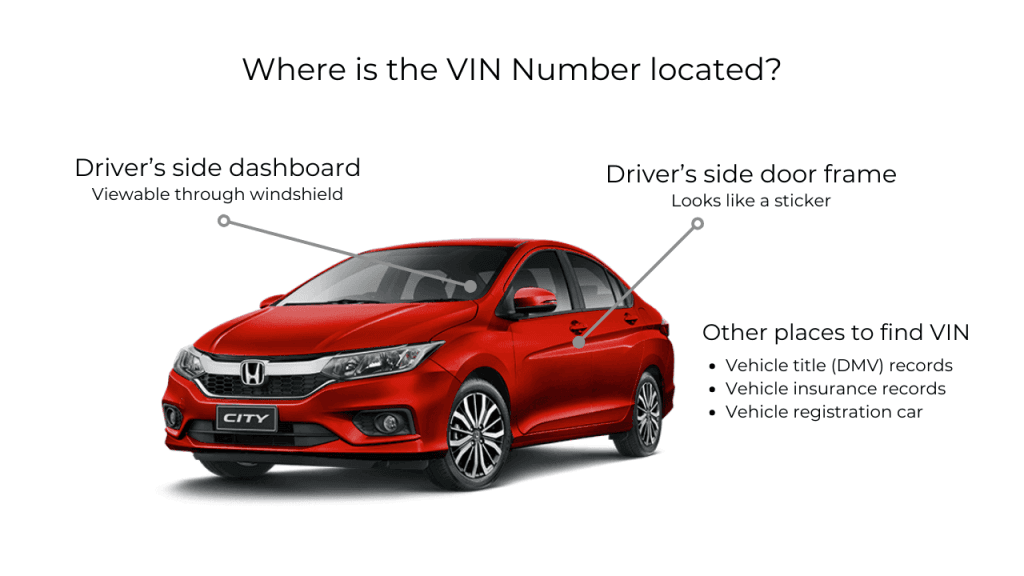
Check the following VIN locations for your Honda vehicle:
Now that you’ve found the VIN, it’s time to retrieve all the information available from the VIN.
 On the dashboard of the vehicle, near the windshield.
- On the driver’s side door jamb.
- On the engine block, check under the hood.
- Just below the steering wheel.
- Check a sticker typically located behind the door latch.
How to Read a Honda VIN Number
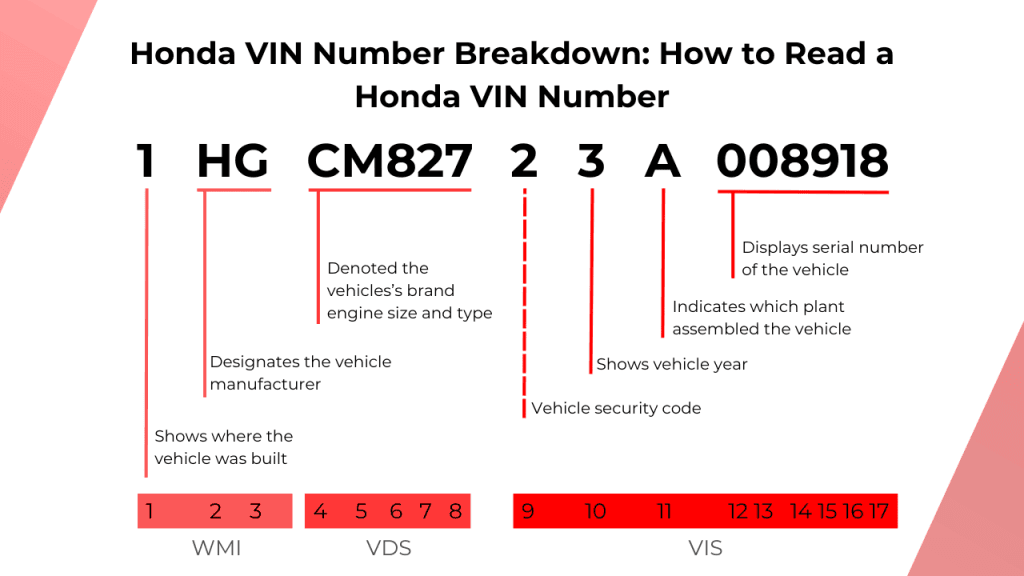
A standard Honda VIN has 17 characters. Each section tells you something different about the vehicle’s factory identity.
VINs do not use the letters I, O, or Q because they can be confused with numbers.
A Honda VIN is usually divided into these three sections:
- World Manufacturer Identifier (WMI) This includes the first three characters (characters 1 - 3) and signifies the vehicle’s country of origin and manufacturer.
- Vehicle Descriptor Section (VDS) This section includes the 4th to 8th characters (characters 4 - 8) and contains information about the vehicle’s make, engine specs, model, and more.
- Vehicle Identifier Section (VIS) Here, you will find the 9th to 17th characters (characters 9 - 17), which encode details like the model year, manufacturing plant code, and a serial number unique to each vehicle.
Characters 1–3: World Manufacturer Identifier
The first three characters are called the World Manufacturer Identifier, or WMI. This section helps identify the manufacturer and production region.
For Honda vehicles, the first character often points to the country or region of production.
| First Character | Common Meaning |
| 1, 4, or 5 | United States |
| 2 | Canada |
| 3 | Mexico |
| J | Japan |
The second character often identifies the manufacturer. For Honda, this is commonly H.
The third character may describe the vehicle type or division, such as passenger vehicle, motorcycle, or commercial vehicle.
Characters 4–8: Vehicle Descriptor Section
Characters 4 through 8 describe the vehicle. Depending on the Honda model and year, this part of the VIN may include information about:
This is where a Honda VIN search is useful. Instead of relying only on a seller’s listing, you can decode the VIN and compare the result with the vehicle in front of you.
Character 9: Check Digit
The ninth character is the check digit. It helps verify that the VIN follows the correct structure.
This character does not describe the model, trim, engine, or plant. It is mainly used to help detect invalid VINs or typing mistakes.
Character 10: Model Year
The tenth character identifies the model year. This helps confirm whether the vehicle year matches the listing, title, or registration.
| Code | Year | Code | Year | Code | Year |
| A | 1980 / 2010 | L | 1990 / 2020 | Y | 2000 |
| B | 1981 / 2011 | M | 1991 / 2021 | 1 | 2001 |
| C | 1982 / 2012 | N | 1992 / 2022 | 2 | 2002 |
| D | 1983 / 2013 | P | 1993 / 2023 | 3 | 2003 |
| E | 1984 / 2014 | R | 1994 / 2024 | 4 | 2004 |
| F | 1985 / 2015 | S | 1995 / 2025 | 5 | 2005 |
| G | 1986 / 2016 | T | 1996 / 2026 | 6 | 2006 |
| H | 1987 / 2017 | V | 1997 / 2027 | 7 | 2007 |
| J | 1988 / 2018 | W | 1998 / 2028 | 8 | 2008 |
| K | 1989 / 2019 | X | 1999 / 2029 | 9 | 2009 |
Character 11: Assembly Plant
The eleventh character identifies the assembly plant. Honda has used different plant codes across different years, models, and vehicle types.
| Code | Common Plant Reference |
| A | Marysville, Ohio |
| B | Lincoln, Alabama |
| C | Alliston, Ontario |
| D | East Liberty, Ohio |
Plant codes can vary, so the most reliable approach is to run the full VIN through the decoder.
Characters 12–17: Serial Number
The final six characters are the unique production sequence. This number separates one Honda from another within a production run.
Together, these characters help identify the specific vehicle, not just the model or trim.
How to Decode a Honda VIN Number
Decode your Honda VIN in three quick steps to preview basic vehicle details and decide if you need deeper History.
- 1
Enter the Honda VIN
Type or paste your Honda VIN number into the decoder tool. - 2
Preview Details for Free
Click “Get Report” to view basic specs such as year, model, trim, engine, fuel type, assembly plant, and estimated market value when available. - 3
Check Deeper History
Need accident, title, odometer, ownership, auction, theft, or lien records? View the paid Honda vehicle history report.
Need More Than Basic VIN Specifications?
After using the free Honda VIN decoder, you may need a deeper Honda VIN check before buying, selling, or verifying a used vehicle. A paid VIN check can help reveal deeper records that are not included in the free basic decode.
A paid Honda VIN check may include:
Title Brand
Check title branding that may affect value, ownership, or resale.
Accident Record
Review accident history to understand possible damage, repairs, or claims.
Ownership History
See ownership changes to understand how the vehicle changed hands.
Auction Records
Check auction listings, sale dates, prices, and condition notes details.
Odometer Readings
Review mileage entries to help identify possible odometer inconsistencies issues.
Theft Records
Check theft records to identify possible stolen vehicle activity alerts.
Lien or Loan Records
Check finance records that may affect purchase or ownership decisions.
Salvage Brand
Identify salvage branding that may indicate major loss or rebuilding.
Start With a Free Honda VIN Search
A free Honda VIN search helps you confirm basic details like year, model, trim, engine, fuel type, MSRP, and estimated market value. For deeper records such as title, accident, odometer, ownership, auction, theft, lien, or salvage history, view the paid Honda vehicle history report.
Frequently Asked Questions
Yes. The free decoder can show the vehicle’s fuel type, such as gasoline, hybrid, electric, or another fuel type, based on the VIN data.
Yes. The decoder can show an estimated market value based on vehicle details and market data. This estimate should be used as a general guide, not a final sale price.
A VIN decoder shows basic specifications. A paid Honda VIN check can show deeper records such as accident history, title brands, odometer readings, ownership history, auction records, theft records, liens, and salvage records.
No. A free VIN decoder is for basic vehicle specifications only. To check accident records, use the paid Honda vehicle history report.
No. Title brands and salvage records are part of a deeper paid VIN check, not the free basic VIN decode.
Yes. A free Honda VIN lookup helps you compare the decoded details with the seller’s listing, title, registration, and physical vehicle before moving forward.
Yes. The decoder can support Honda motorcycles, ATVs, and powersports vehicles if the VIN data is available. Enter the VIN exactly as shown on the vehicle or documents.