
Check Any Honda Options by VIN
Check Honda Options by VIN to confirm original factory options, equipment, packages, colors, and pricing. Get useful details to help verify a Honda before buying or selling.
What Are Honda Options and Packages?
Honda options are features or equipment added to a vehicle beyond its basic configuration. Packages combine several features into one factory offering for a specific model or trim.
The exact options and packages vary by Honda model, year, and trim. Looking up the Honda window sticker by VIN can help identify the equipment included with a specific vehicle when it was originally sold.
What to Expect When You Look Up Honda Options by VIN
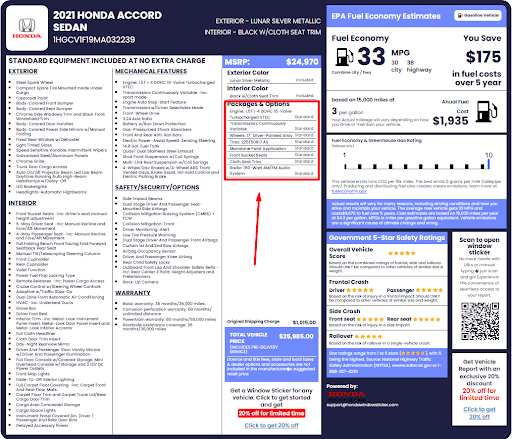
A Honda options lookup can provide VIN-linked factory information through a recreated window sticker, helping you review available equipment, packages, colors, pricing, and original configuration details.
Factory-Installed Options
Factory-installed options are features added to a Honda during its original production or preparation. A VIN lookup can help identify equipment linked to that configuration.
Optional Packages
Optional packages group several features together for a particular Honda model or trim. Your results may show packages included in the vehicle’s original factory configuration.
Standard Equipment
Standard equipment includes features that came with the Honda’s specific trim without being separately selected as optional equipment. This helps explain the vehicle’s original setup.
Exterior Features
The lookup may show exterior details such as the original paint color, wheels, lighting, roof features, and other equipment included with the Honda’s factory configuration.
Interior Features
Interior information may include seating materials, infotainment equipment, climate controls, technology, convenience features, and other factory-installed equipment linked to the vehicle.
Safety and Driver Assistance Features
Depending on the vehicle and available data, results may identify safety and driver assistance features included with the Honda’s original factory configuration.
What Honda Options by VIN Cannot Tell You?
A Honda options lookup focuses on the vehicle’s original factory configuration. It can help identify equipment and packages, but it does not show everything that may have happened to the vehicle since it was built.
Current Vehicle Condition
Factory information cannot tell you the Honda’s current mechanical or cosmetic condition or confirm whether every original feature still works properly.
Accident, Title, or Mileage History
Options data does not confirm accidents, title records, ownership history, or current mileage. For these records, check a Honda vehicle history report.
Aftermarket Modifications
A factory options lookup usually does not show accessories, upgrades, or modifications added after the Honda left its original factory configuration.
Replaced or Removed Equipment
The lookup may show how the Honda was originally equipped, but it cannot confirm whether factory parts or features were later replaced or removed.
How to Check Honda Options by VIN?
Checking Honda VIN options takes three simple steps. Enter the vehicle information, review the basic details, then access the factory information.
- 1
Enter the Honda VIN
Enter the Honda’s 17-character VIN in the form at the top of the page. You can also search using a U.S. license plate or vehicle details. - 2
Submit the Form
Submit the form to preview basic information about the Honda. Results can include the year, make, model, trim, engine, transmission, fuel type, and more. - 3
Verify Honda Options
Pay to retrieve the Honda window sticker and review original options, equipment, MSRP, colors, fuel economy, and other available factory information.
How to Find a Honda VIN Number
You’ll need the Honda’s VIN to check its original options and factory information. The 17-character VIN can usually be found on the vehicle or common ownership documents.
Driver-Side Dashboard
Look through the windshield on the driver’s side. The VIN is usually displayed on a small plate near the bottom of the windshield.
Driver-Side Door Jamb
Open the driver’s door and check the certification label attached to the door jamb. The vehicle’s VIN is usually printed there.
Title and Registration
The Honda’s VIN should also appear on the vehicle title and registration documents along with other identifying vehicle information.
Insurance and Service Documents
Insurance paperwork and some repair or maintenance records may also list the VIN, providing another way to confirm the number before your lookup.
Want to understand what your Honda VIN means? Use our Honda VIN decoder to identify basic vehicle information and learn how the 17-character VIN is structured.
When Is a Honda Options Lookup Useful?
A Honda options lookup is useful when you need to compare the vehicle’s original factory equipment with what you see today. Here are some common situations where checking the original configuration can help.
Before Buying a Used Honda
Check the original equipment before buying to compare factory options, packages, colors, and features with the seller’s description.
Before Selling Your Honda
Review the original options before creating a listing so you can describe the Honda’s factory equipment and configuration more accurately.
When Verifying a Vehicle Listing
Compare the advertised features with available factory information to see whether the listed trim, packages, and equipment match the original configuration.
When Researching an Unusual Configuration
Factory information can help identify packages, colors, or equipment that may be difficult to recognize from the vehicle’s appearance alone.
Honda Models You Can Look Up
Our Honda options lookup supports many popular Honda cars, SUVs, minivans, and trucks. Enter the VIN to check available information for your specific vehicle.
Accord | Civic | CR-V | Pilot | HR-V |
Odyssey | Passport | Ridgeline | Prologue | Element |
Fit | Insight | Clarity | Crosstour | CR-Z |
S2000 | Prelude | CRX | del Sol | Civic Type R |
Find Other Honda VIN Tools
Explore these additional VIN search tools for more vehicle records. Make an informed decision with confidence.
Check Honda Options by VIN
Enter the VIN to view available original Honda options, equipment, packages, colors, pricing, and other factory configuration details through the Honda window sticker.
Frequently Asked Questions About Honda Options by VIN
Yes, you can check Honda options by VIN using our tool to identify available original factory equipment, packages, colors, and other vehicle details linked to its specific configuration.
To find the original options on your Honda, enter its VIN into our car options lookup by VIN tool and access the window sticker showing available factory information.
Yes, a Honda VIN can help identify factory-installed equipment when matched with detailed vehicle data. The VIN itself does not directly display a complete equipment list.
You may find general Honda options using the year, make, and model. However, a VIN provides more specific information about an individual vehicle’s original configuration.
Yes. Our tool allows you to look up Honda options using the U.S. license plate to generate the window sticker, which shows the options, packages, and other factory build information.
A Honda VIN does not directly display the original MSRP. A detailed window sticker lookup or a VIN decoder can provide the original MSRP and other pricing information.
Yes, Honda options and packages by VIN may be available through detailed vehicle data. Results depend on the Honda's model, year, configuration, and available records.
You may be able to find the Honda’s original exterior color through detailed VIN-linked data or its window sticker, depending on the vehicle and available information.
Yes, a Honda window sticker can be recreated using VIN-linked vehicle information. It may show original MSRP, equipment, options, colors, fuel economy, and other details.
No, a Honda VIN does not directly show aftermarket options. Factory data generally reflects the vehicle’s original configuration, not modifications added after production or sale.
Yes, you can use our tool to check options on an older Honda, even with 5-14 digits, when supporting data is available. However, older vehicles may have fewer factory details than newer models.